When importing a list of Targets from outside of the Chainlink Marketing Platform, you have a few options when it comes to your Targets’ profile field management. These settings will come in handy if you are importing a list of Targets, and some of those Targets already exist in your platform account, in a different Data Source. You will be able to customize the import settings for creating new Targets, and updating existing Targets’ profile information. These settings also help ensure that no duplicate email addresses are added to the platform.
You will also have the option of editing these settings for specific target imports. Every time you are importing targets, this import settings page will be part of the import workflow, allowing you to change your import settings just for that specific import. Your default import settings will be the default options on this page, but you can easily change them for any individual import.
Note: Every new account’s default import settings will be set to Create And Update / Leave Existing Value.
To access your Default Target Import Settings, navigate to Settings > Account Settings > Default Target Import Settings.
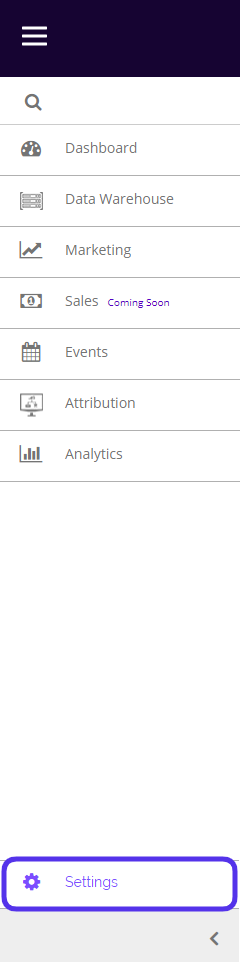
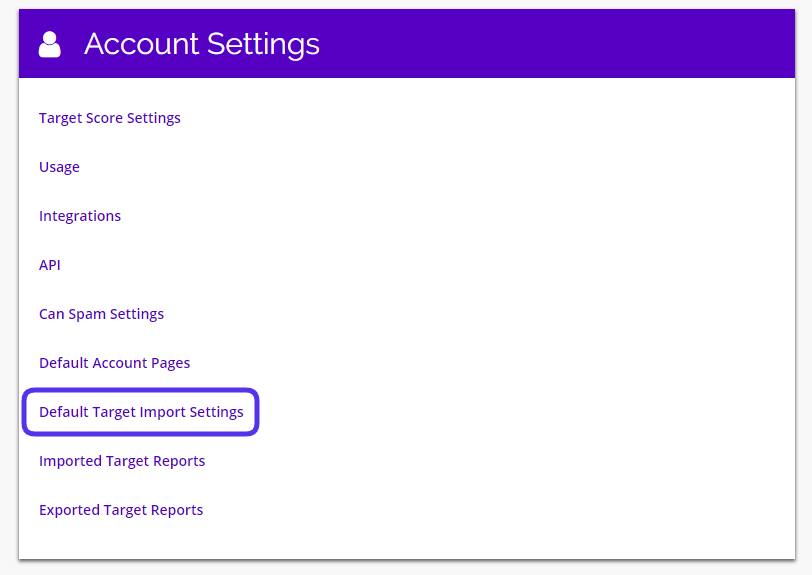
This is what the Default Target Import Settings page looks like:
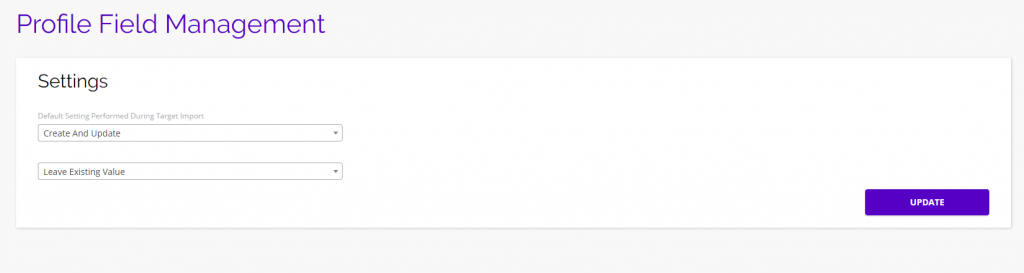
From here you will be able to decide if you want to Create And Update, Create Only, or Update Only for the Targets you are importing to the platform. If you select one of the update options, you will also be able to choose if you want to Leave Existing Profile Values, or Overwrite Profile Values With NULL (no value).
Note: This page is your Default Import Settings, but this page will also appear whenever you are importing Targets to the platform. This gives you the ability to edit your import settings for specific imports.
Create Only
If you select the Create Only option, only new Targets will be created, without updating any existing Targets’ information. If you are importing a lists of Targets, with some matching Targets already in the platform, the existing Targets will be unchanged and remain in their original Data Source, while the new Targets will be added to your new Data Source.
Create And Update
Create And Update is the most common import setting, and is set as the default option for all new accounts. This means if you are importing a list of Targets, with some matching Targets already in the platform, the existing Targets will be updated with any new information you’ve included, while remaining in their original Data Source, and the new Targets will be created and added to your new Data Source.
If you choose one of the update options, there will be a second drop-down where you can decide if you want to Leave Existing Values, or Overwrite with NULL. This feature might come in handy if you have existing Targets with a custom profile field, like AGE. If you are importing a new data source that has matching Targets, but this new source does not contain the field AGE, you can decide if you want these existing Targets to Leave Existing Values, or Overwrite With Null (no value). If you leave existing values, the old profile fields will not be changed and those Targets will still have the AGE profile field, but if you choose to overwrite with null, the AGE profile fields that are not included in the new import will be removed from the existing profiles and replaced with null/no value.
Update Only
If you select Update Only, no new Targets will be created, only existing Targets’ information will be updated.
If you choose one of the update options, there will be a second drop-down where you can decide if you want to Leave Existing Values, or Overwrite with NULL. This feature might come in handy if you have existing Targets with a custom profile field, like AGE. If you are importing a new data source that has matching Targets, but this new source does not contain the field AGE, you can decide if you want these existing Targets to Leave Existing Values, or Overwrite With Null (no value). If you leave existing values, the old profile fields will not be changed and those Targets will still have the AGE profile field, but if you choose to overwrite with null, the AGE profile fields that are not included in the new import will be removed from the existing profiles and replaced with null/no value.