• My Account
  • Help & Support
  • Knowledge Base
  • FAQs
  • My Account
  • Help & Support
  • Knowledge Base
  • FAQs
home/Knowledge Base/Getting Started

Support Tickets

11 views 0 June 12, 2018 November 7, 2018 lucas

The Chainlink Marketing Platform provides an extensive list of Knowledge Base articles and FAQs that should help to answer almost any questions or issues you’re having with the platform. However, if you run into a problem that you can’t find the answer to in our documentation, there is always the option of submitting a support ticket. On every page within the platform, there is a help tool in the bottom right corner. If you expand the help section, you will find a short explanation of the feature and a link to the respective Knowledge Base.
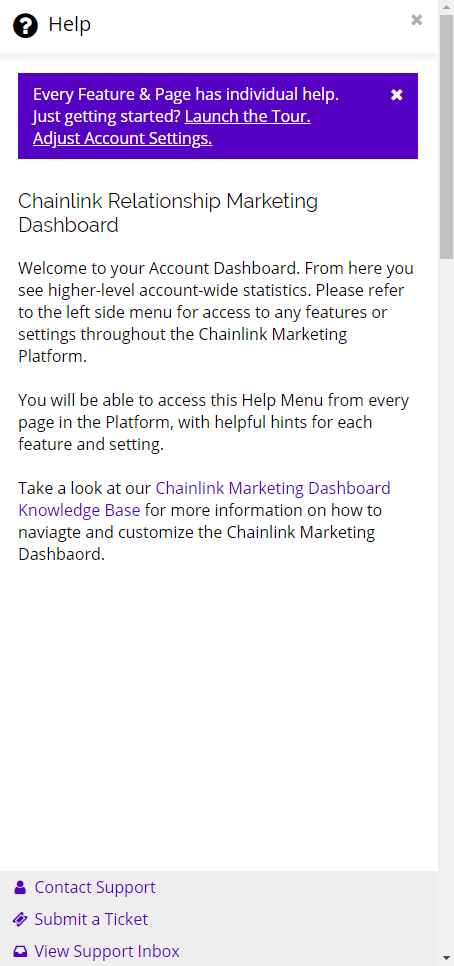
 

Chainlink marketing platform support


  • At the bottom of every help overlay, you will find a few links that you can use to easily submit a support ticket that will be review and resolved by a platform admin as soon as possible.
  • Click Contact Support or Submit a Ticket and you will be brought to a new Support Ticket page where you can enter the subject, department, priority, and a description of the issue.
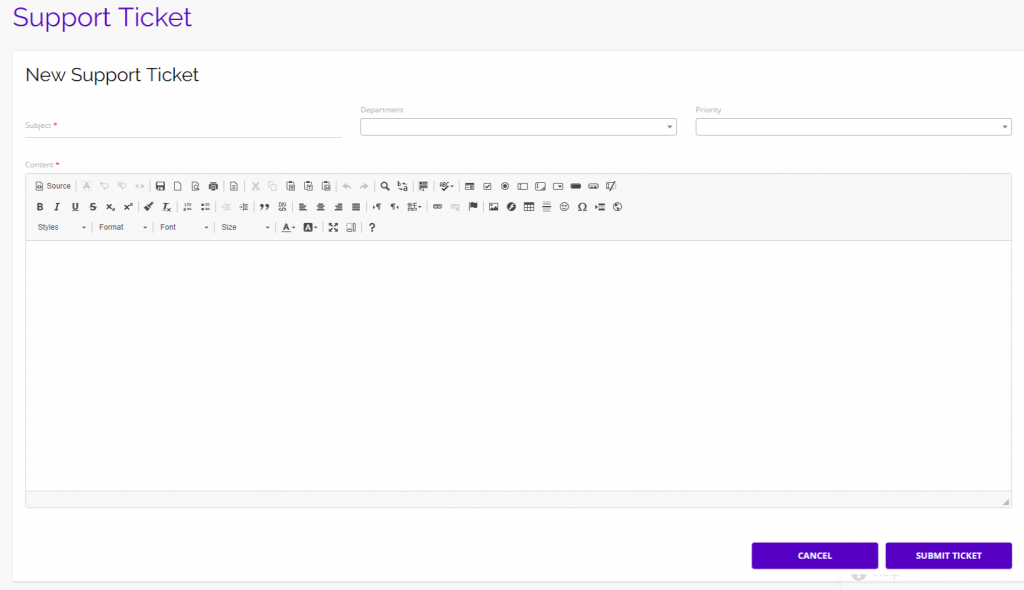
chainlink marketing platform support ticket

  • Be as specific as possible when describing the problem you are encountering, include which department you need support with, and indicate the priority level so our platform admins are able to get to the bottom of the issue as fast as possible.

  • You can also view all of your active and previous support tickets by clicking View Support Inbox.
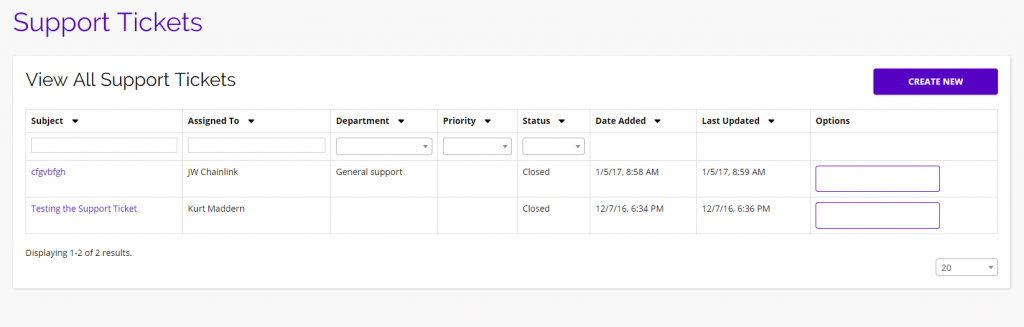
chainlink marketing platform support

  • From this page you will be able to view all of your support tickets, what their status is, when they were added, and when they were last updated.
  • Hover over the purple square in the options column and click on the view icon that appears to view the details of a specific support ticket.
  • Click the Create New button in the top right to open a new support ticket.

Was this helpful?

Yes  No
Related Articles
  • Messages & Notifications
  • Default Account Settings Setup
  • Getting Started with your Chainlink Marketing Platform Account
  • Marketing Overview
  • A Quick Tour of the Marketing Dashboard
  • How to Create a Chainlink Marketing Platform Account
Category
  • Attribution
  • Call To Action
  • Campaigns
  • Data Sources
  • Email Marketing
  • Events
  • Forms
  • Getting Started
  • Landing Pages
  • Media Manager
  • Parades
  • Reporting
  • Segments
  • Settings
  • Social
  • Targets
  • Variables
  • Workflow
Contact Us

info@chainlinkmarketing.com

Submit a Ticket

Company
  • Digital Marketing Services
  • Website & Software Development
  • Chainlink Marketing Platform
  • Agency Partnerships
  • Careers
Chainlink Marketing Services
  • Search Engine Optimization
  • Website Development
  • Email Marketing
  • Content Marketing
  • PPC, Display, & AdWords
  • Social Media Marketing
  • Event Marketing
  • Integrated Print & Offline
  • Promotional Swag
Marketing Insights
  • Search Engine Optimization
  • Content Marketing
  • Social Media
  • Email Marketing
  • E-Commerce Marketing
  • Pay Per Click (PPC)
Primary Office

NYC Headquarters
1 Little West 12th Street
New York NY 10014
info@chainlinkmarketing.com
+(844) 701-2808

  • © Copyright Close The Loop Advertising, Inc, 2013 - 2018 - Privacy Policy