• My Account
  • Help & Support
  • Knowledge Base
  • FAQs
  • My Account
  • Help & Support
  • Knowledge Base
  • FAQs
home/Knowledge Base/Media Manager

Media Manager

17 views 0 June 15, 2018 November 26, 2018 lucas

Use the Media Manager to update, add, or remove any images or media you want to use in your Marketing Efforts. This is the easiest place in the Chainlink Marketing Platform to add multiple images at one time and organize accordingly.


To access your Media Manager, navigate to Marketing > Media Manager
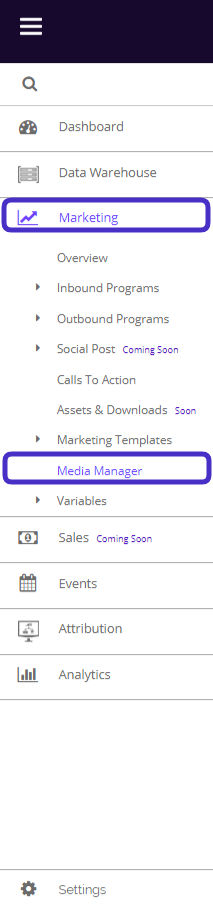
Chainlink navigate media manager


This is what your media manager dashboard looks like:
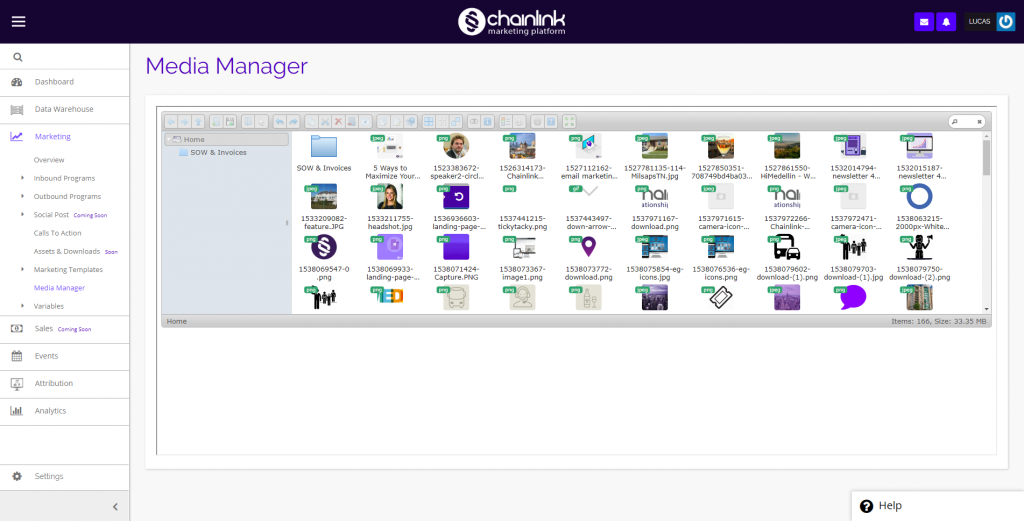
 

chainlink marketing platform media manager


  • From here you can manage all of your media files in the platform by creating new folders, uploading files from outside of the platform, and sorting your files.
  • Click on any file to see a preview in a separate window.


  • To create a new folder, click:

Chainlink media manager new folder


  • To upload new media files, click:

Chainlink media manager upload new files


  • To change the view from icon view to list view, click:

Chainlink media manager list view icon view


  • To sort your media files by name, size, kind, or date, click:

Chainlink media manager sort by


Was this helpful?

Yes  No
Category
  • Attribution
  • Call To Action
  • Campaigns
  • Data Sources
  • Email Marketing
  • Events
  • Forms
  • Getting Started
  • Landing Pages
  • Media Manager
  • Parades
  • Reporting
  • Segments
  • Settings
  • Social
  • Targets
  • Variables
  • Workflow
Contact Us

info@chainlinkmarketing.com

Submit a Ticket

Company
  • Digital Marketing Services
  • Website & Software Development
  • Chainlink Marketing Platform
  • Agency Partnerships
  • Careers
Chainlink Marketing Services
  • Search Engine Optimization
  • Website Development
  • Email Marketing
  • Content Marketing
  • PPC, Display, & AdWords
  • Social Media Marketing
  • Event Marketing
  • Integrated Print & Offline
  • Promotional Swag
Marketing Insights
  • Search Engine Optimization
  • Content Marketing
  • Social Media
  • Email Marketing
  • E-Commerce Marketing
  • Pay Per Click (PPC)
Primary Office

NYC Headquarters
1 Little West 12th Street
New York NY 10014
info@chainlinkmarketing.com
+(844) 701-2808

  • © Copyright Close The Loop Advertising, Inc, 2013 - 2018 - Privacy Policy

