In this guide, you will learn about Calls-to-Action (CTAs) and how you can use them to optimize your website, blog, and email.
What is a Call-to-Action?
A call-to-action (CTA) is a button or link that you use in your marketing that drives prospective customers to become leads by filling out a form on a landing page. A CTA is a link between the regular content that your potential customer is interested in, and a page with a more high-value offer on it (the landing page) that is relevant and interesting enough to persuade your visitor to complete a short form.
CTAs can use all kinds of different wording to attract attention from qualified leads, including:
- Start a free trial
- Sign-Up Today!
- Download my free resource
- Book an appointment
- Get a free quote
The Chainlink Marketing Platform uses CTAs frequently on our website. Here’s a good example:

Best Practices
Follow these guidelines to create CTAs that adhere to established best practices.
CTAs should be:
- Visually striking with copy that compels you to click the offer
- Brief: A couple of words is best, no more than five is ideal
- Action-oriented: Begin with a verb like “Download” or “Register”
- Located in an easy-to-find spot that follows organically from the flow of the webpage
- In a contrasting color from the color scheme of the webpage, while still fitting in with the overall design
- Large enough to see from a distance, but not so large as to detract attention from the main content on the page
- Easy to understand and clear: Be sure to state exactly what the visitor will get if they click on the CTA and go to the landing page
CTA in Chainlink Marketing Platform
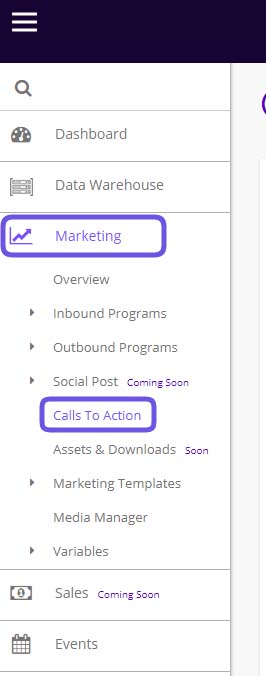
From your Chainlink Marketing Platform dashboard, navigate to Marketing > Calls-to-Action.
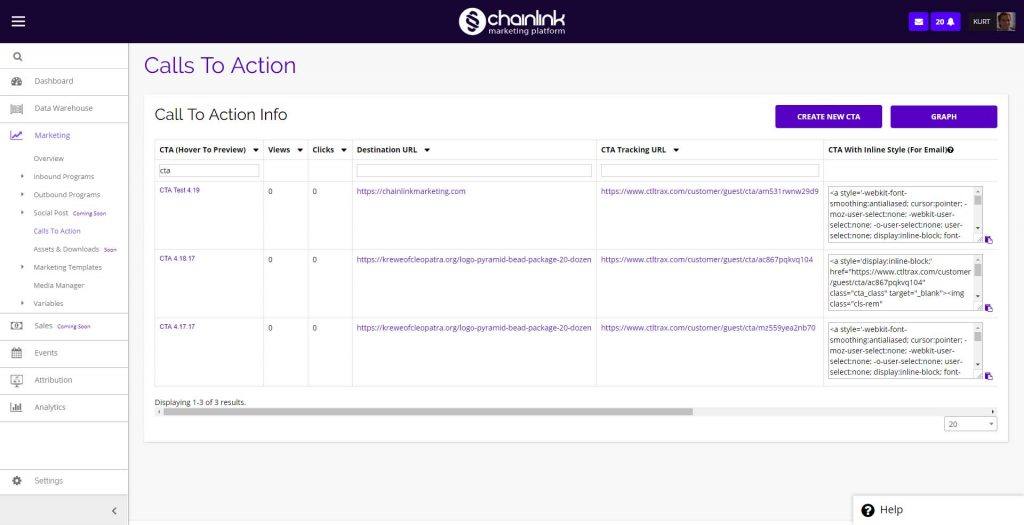
This is the Calls-to-Action area.
Some uses for CTAs
CTAs come in all forms, sizes, and colors. With the Chainlink Marketing Platform, you can customize for every situation depending on whether you’re attracting leads or customers or want to drive attendance for an upcoming event. Take a look at the following CTA tips to give you some ideas of how you can use CTAs.
1. CTAs to generate leads
The main goal of this CTA is to take your current website or blog traffic and convert them into leads. These are most effective on a high-traffic area of your website that will attract lots of viewers, like on your blog posts. Lead generation CTA’s perform best when they’re at the end of a post, pop-in from the bottom, or located in the sidebar.
Here is an example of a Lead Generation CTA.

2. Social Sharing CTA
It may seem obvious, but social sharing buttons, like for Twitter and Facebook, are an effective, easy way for visitors to become involved with your company. Place these CTAs on blog posts and landing pages, but be careful to not include them in spots where people are submitting their personal information.

3. Lead Nurturing CTA
After you’ve turned your website traffic into qualified leads, you’ll want to provide encouraging Lead Nurturing CTAs to promote your leads to purchase your product and service, so you may want to offer something related to your product, like a free trial or demo. You’ll want to place these CTAs on areas of your website where “lead” traffic tends to flow through, such as product details pages.
Here is an example of a strong Lead Nurturing CTA.

4. Close the Sale
As you move further down the marketing funnel, CTA’s can be extremely powerful to converting leads into customers. You want to provide a level of comfort to your buyers and provide the right offer at the right time through a clear Call To Action. These work very well on product pages, as this is where most of the interested buyers will be searching on your website.
Here’s an example of a sales-focused CTA.

5. Event Promotion
CTA can be extremely effective for driving event signups and attendance for your next webinar or event.
Here is a sample of how to promote an event with a CTA.